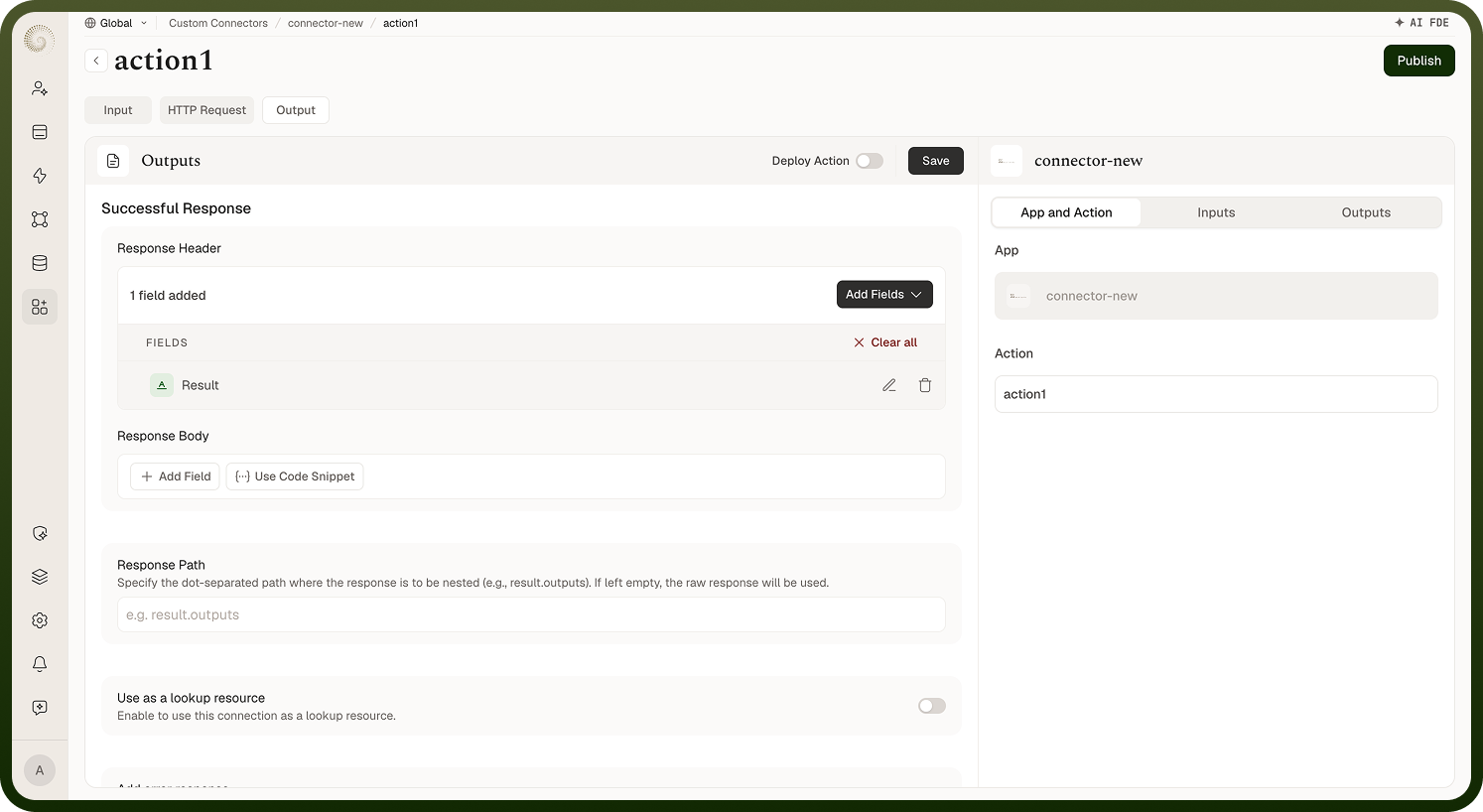
Turning the API's response into the action's outputs.
Overview
When an action runs, the platform takes the API's HTTP response and turns it into the action's outputs based on what you declared on the Output tab: the Successful Response section defines the response body fields (each with a key, label, and type, nestable for structured data) and any response headers you want exposed. The platform fills this schema from the real response each run, so a "Create record" action can return the new record's id from the response body, and a later automation step can reference it.
Handling a response where the data is nested
APIs often wrap the useful data inside an envelope — for example the records sitting under a nested path. Set the Response Path — the dot-separated path where the useful response lives (for example, result.outputs) — and the action's outputs operate on that data rather than the wrapper. Left empty, the raw response is used. Pointing the connector at the nested data is what gives downstream steps clean fields to work with, instead of the whole envelope.
FAQs
How are errors from the API represented?
Turn on Add error response and declare the error's Response Body and Response Header fields. This one shape is used whenever the API returns an error status (the Status Code field shows * and can't be changed). When the API fails, the action surfaces that structured shape — so an automation can branch on the failure or show a meaningful message rather than a generic error; without one, the raw error body comes through. (Whether a given status fails, retries, or refreshes credentials is handled automatically — see the error-handling screen.)
Does the response have to be JSON?
No. JSON is the primary case and what the output schema maps most naturally, but the connector runtime also parses XML responses (including SOAP-style envelopes) against your declared schema, and can return a file — a binary download is stored and handed to the automation as a file reference — where the API serves one. The action's outputs reflect the real shape of what the API returns.
Can an action feed dropdowns in other actions?
Yes. Mark the action Use as a lookup resource and tell the platform where the list lives in its output (the source list), which field is the output id, and the resource name. Other inputs across the connector can then use this action as a lookup — a dropdown whose options load live from the API (for example "pick a board" populated by your "list boards" action). This, combined with dropdown inputs and dependent fields, is what makes a custom connector feel native to configure.