


The AI Evaluator Node scores the quality of AI outputs against defined metrics, giving you automated regression tests for agents and prompts so you can catch quality drops between versions without reviewing results by hand.
Overview
The AI Evaluator node measures the quality of your AI outputs so you can test and monitor agents and prompts systematically instead of reviewing results manually. You define metrics, supply evaluation cases, and the node scores each one. Use it to build a regression suite for your AI, catch quality drops between versions, and compare agent or prompt variants against each other.
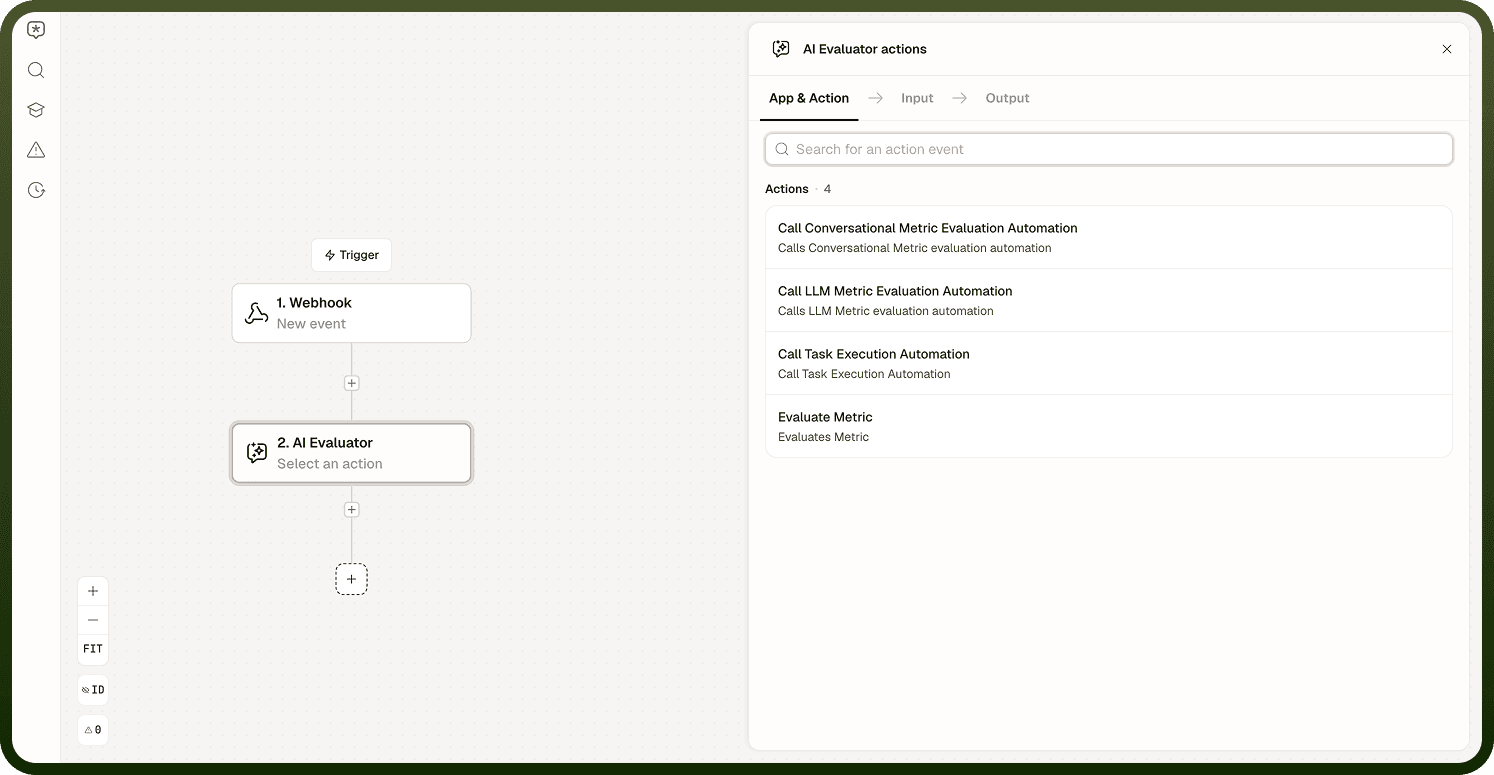
Evaluation Types
The AI Evaluator supports four evaluation types:
Metric evaluation — a one-shot evaluation of a single input/output pair against your defined metrics.
Conversational evaluation — scores a full conversation exchange rather than a single turn, capturing quality across an entire dialogue.
Task execution evaluation — runs a task end-to-end and judges the result, not just the output text.
Outcome evaluation — receives the complete agent session trace and returns whether the outcome was achieved, what it is worth, and why.
Operations
The node has 12 operations. Each evaluation type has a trigger that starts the evaluation automation, a Call action that runs it from another automation, and a Respond action that sends the result back.
Evaluation type | Trigger | Call action | Respond action |
|---|---|---|---|
Metric | Triggers LLM metrics evaluation | Call LLM Metric Evaluation Automation | Respond to metric evaluation |
Conversational | Triggers Conversational metrics evaluation | Call Conversational Metric Evaluation Automation | Respond to metric evaluation |
Task execution | Trigger task execution | Call Task Execution Automation | Respond to task execution |
Outcome | Triggers Outcome evaluation | Call Outcome Evaluation Automation | Respond to outcome evaluation |
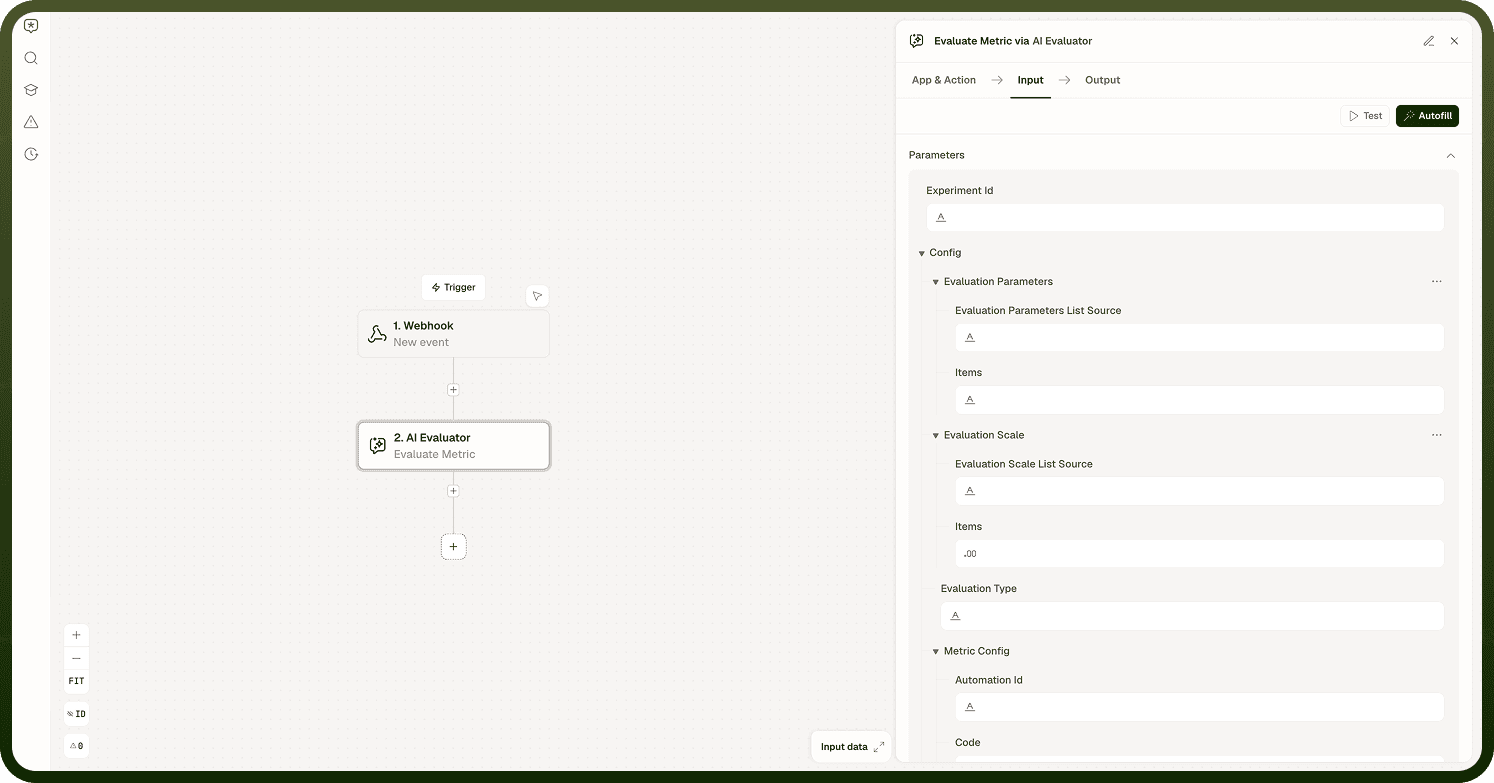
The twelfth operation, Evaluate Metric, evaluates a metric directly. Its fields are loaded from the platform's built-in metric evaluation definition, so you don't need to build a separate evaluation automation.
Input
Each Call action has one main field: Automation to call. After you pick the automation, a Parameters section loads the fields defined on that automation's trigger, and you map the values for the evaluation case there. The task execution action has one additional setting. The fields listed below are the trigger's default fields; you can change them on the trigger.
Metric Evaluation
Configured on the Call LLM Metric Evaluation Automation action.
Input Field | Description |
|---|---|
Automation to call | The automation this action triggers to run the evaluation. Only automations with LLM evaluator metric triggers can be called; you can also enter a custom value. |
Parameters | The fields from the called automation's Triggers LLM metrics evaluation trigger. By default: input, expected_output, context, expected_tools, actual_output, retrieved_context, tools_called, metadataFields, additional and additional_output_properties. |
Conversational Evaluation
Configured on the Call Conversational Metric Evaluation Automation action.
Input Field | Description |
|---|---|
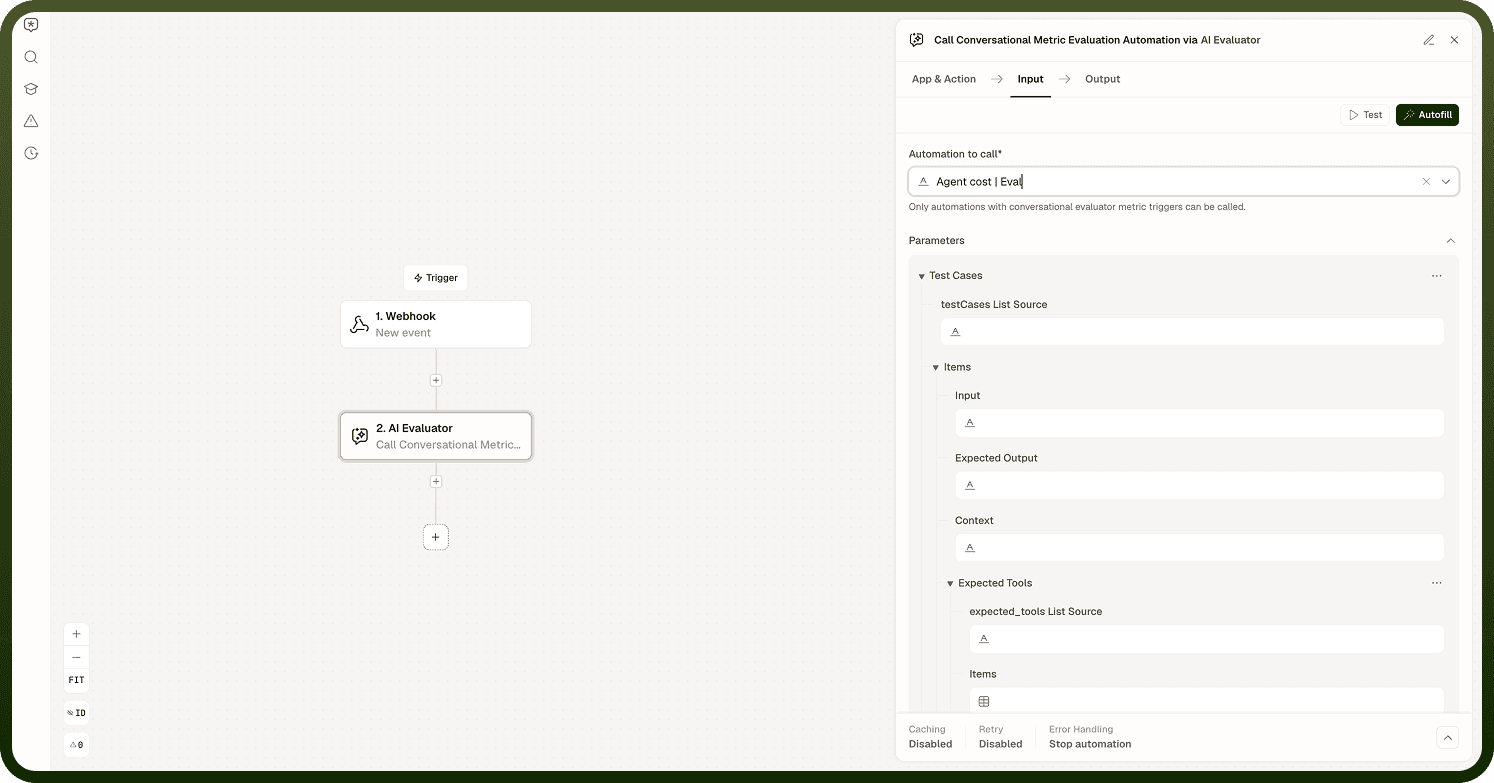
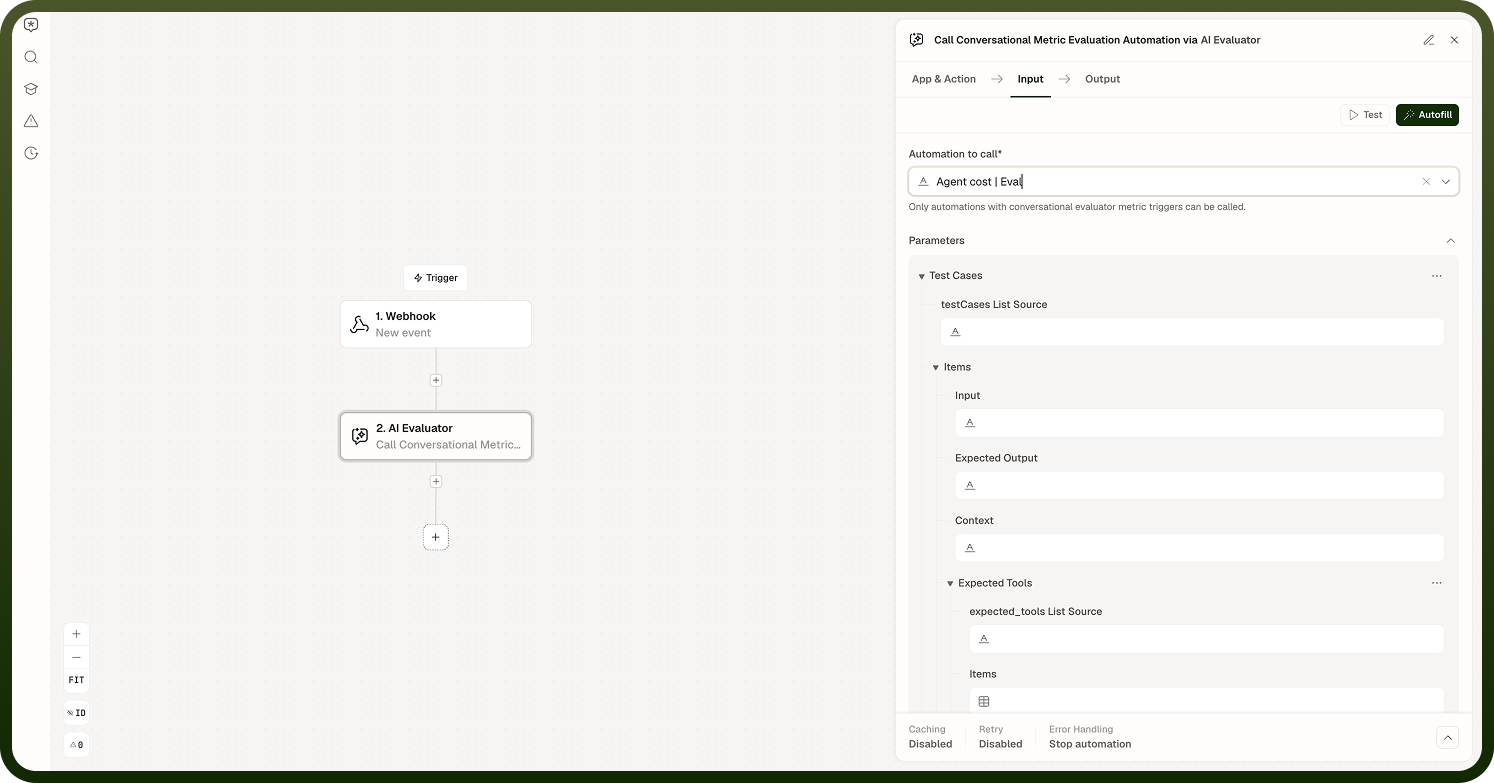
Automation to call | The automation this action triggers to run the evaluation. Only automations with conversational evaluator metric triggers can be called; you can also enter a custom value. |
Parameters | The fields from the called automation's Triggers Conversational metrics evaluation trigger. By default this is a testCases list, where each item holds the same fields as a metric evaluation case (input, expected_output, context, actual_output and so on), one per turn of the conversation. |
Task Execution Evaluation
Configured on the Call Task Execution Automation action.
Input Field | Description |
|---|---|
Automation to call | The automation this action triggers to run the task. Only automations with task triggers can be called; you can also enter a custom value. |
Trigger Workflow With RunTime Type | Optional. Controls how the called automation is run — choose DEFAULT or IN_MEMORY. |
Parameters | The fields from the Setup of the called automation's Trigger task execution trigger. By default: input, expected_output, context, expected_tools, metadataFields, additional and caseId. |
There is no actual output input on this path: the called automation runs the task and returns the actual output (with retrieved_context, tools_called, cost and other fields from the trigger's Result Schema) through Respond to task execution.
Outcome Evaluation
Configured on the Call Outcome Evaluation Automation action.
Input Field | Description |
|---|---|
Automation to call | Only automations that start with the Outcome evaluation trigger can be called; you can also enter a custom value. |
Parameters | The fields from the called automation's Triggers Outcome evaluation trigger. By default it receives the complete agent session trace: agentProfileId, outcomeId, bookedAt, session, traces and spans. |
The called automation returns its verdict through Respond to outcome evaluation: booked (true if the session achieved the outcome), value (what the outcome is worth), reason (shown as evidence on the booking) and externalRef (the ID of the record that proves it, for example a Salesforce record ID).
How Scoring Works
Scoring combines automated similarity metrics with model-based judgement. By default the node uses a semantic similarity metric that compares the actual output against the expected output as text. Evaluation can also use a model to judge quality against your defined criteria. Each evaluated case returns:
Score — the numeric quality score for the case.
Reason — an explanation of why the case received that score.
Cost — the cost of running the evaluation for that case.
Trigger-and-Callback Pattern
Evaluation runs do not block the calling automation. Instead, the AI Evaluator uses a two-part pattern:
A trigger operation (for example Triggers LLM metrics evaluation) defines the evaluation's inputs and starts the evaluation job. The work runs as its own automation, which you call with the matching Call action.
A Respond operation (Respond to metric evaluation, Respond to task execution or Respond to outcome evaluation) sends the result back once the evaluation completes.
This decoupling lets evaluations run as independent jobs — and in parallel when you have multiple cases — without holding up the caller. When you wire an evaluator, you must set up both ends: the trigger that starts it and the response that reports the result back. If the return-response operation is missing, the evaluation has no destination for its output.
Notes
To make the most of it:
Build a representative set of cases that covers the range of inputs your agent or prompt will encounter in production, not just the easy ones.
Always wire the return-response operation — without it, evaluation results are discarded.
Read the Reason field for every case whose score surprises you; the explanation tells you whether the issue is in the output, the expected answer, or the metric definition.
Run evaluations after any change to an agent's instructions, tools, or knowledge to catch regressions before they reach users.
Evaluate enough cases per run that one outlier does not distort your overall quality reading.