


The Test button on a step's Input tab runs just that step in isolation — using its current configuration and any sample values you have entered — without triggering the whole automation. It's the fastest way to verify a step is correctly set up before moving on to the next one.
How It Works
Open the step you want to test and go to its Input tab. Fill in the fields, then click Test. A test window opens. Under Test Input, enter temporary values for any data pills that don't yet have upstream output to draw from, then click Run Test. The step executes against the real connection, and the actual response appears under Test Result.
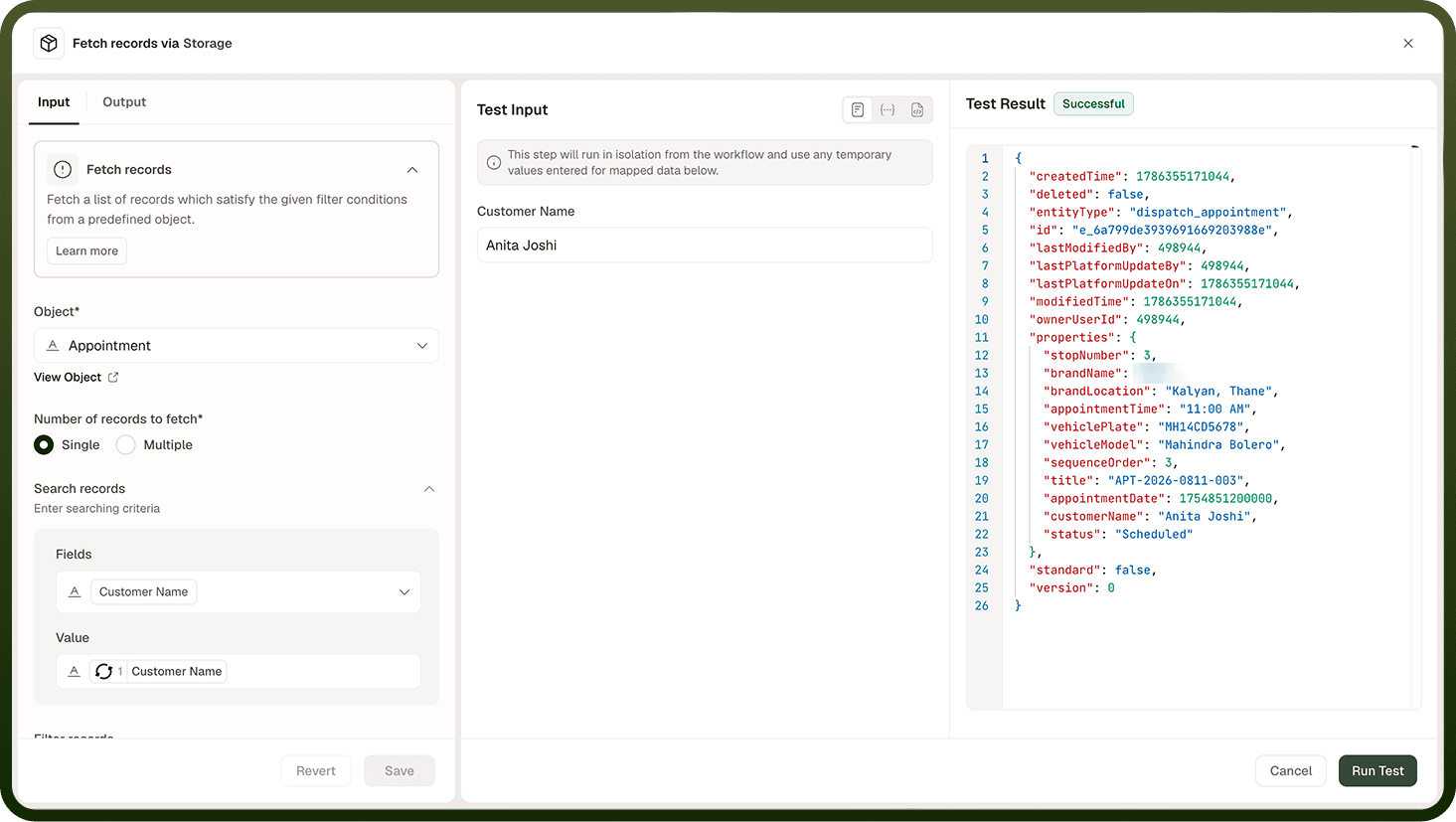
Use the Test Result panel to see the real values the step returns. The step's Output tab in the builder always shows the step's output schema, not test data — map fields from there with data pills.
Scope of a Step Test
A step test executes only the selected step. It does not run any preceding steps, re-trigger the automation, or affect any saved or deployed state. The test uses the connection and inputs you have configured at that moment.
Note: Triggers and control-flow steps (condition, branch, loop, scope) do not have a Test button. Test a trigger by running the whole automation: switch to Test, click Run, and supply trigger data in the New Test dialog (Form or JSON).
After Testing
The Test Result panel shows the step's real result. Check that the fields you plan to use downstream exist in the response and contain the values you expect. If the step returns an error, the error message appears under Test Result — use it, or Debug with AI, to diagnose misconfigured inputs or connection issues before saving.
Notes
Keep the following in mind when testing a single step:
Test results are ephemeral — they appear in the test window but are not saved as a run record. Use Test Studio for persisted end-to-end test runs.
Actions that create or modify records in a connected system will do so during a step test — use caution when testing steps that write data to production systems.
Supply concrete sample values for data pill fields that reference earlier steps you have not yet tested, so the step has something to act on.
Step-level testing catches configuration issues early, before a full automation run surfaces errors across multiple steps.