


The Platform Tools node is meta-tooling that lets an automation discover what the platform can do and resolve schemas on the fly, rather than having everything hard-wired at build time. It is especially useful for AI agents and dynamic builders that need to find the right operation and understand its shape at runtime.
Overview
Platform Tools provides two broad capabilities:
Discovery — search, browse, and inspect nodes and their operations without knowing in advance what is available.
Schema resolution — compute the actual input or output shape of a node given a specific configuration, so downstream wiring can be done accurately before a run starts.
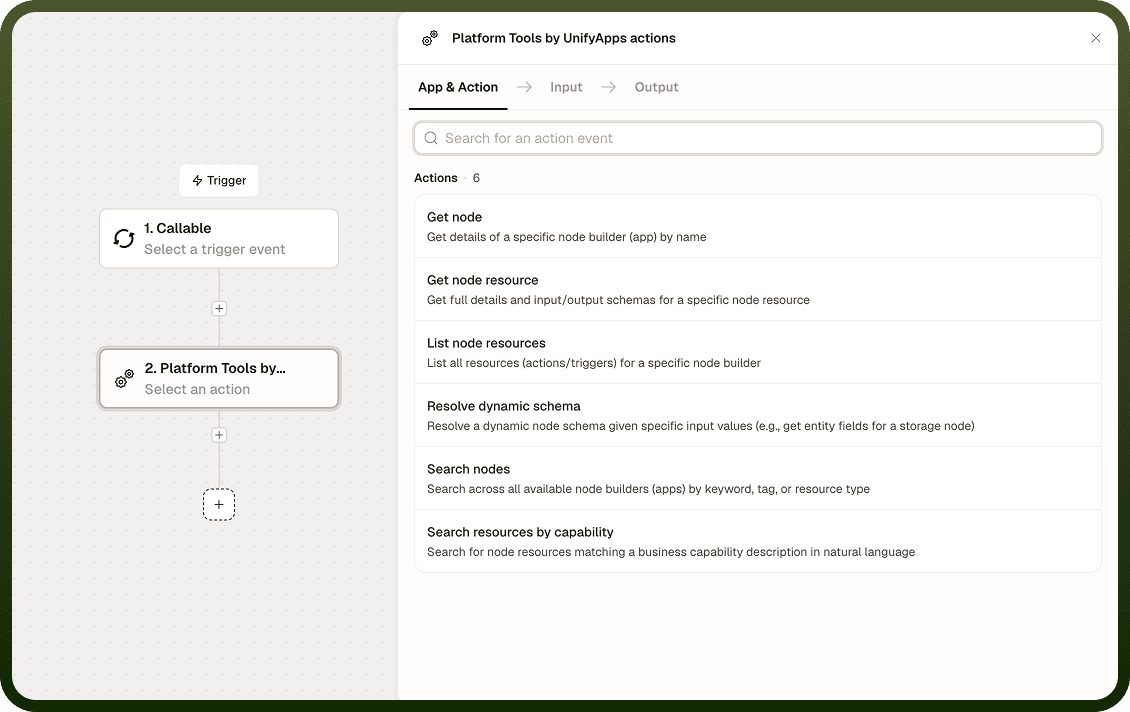
Discovery Operations
Platform Tools has six actions. Four help you find what you need:
Search nodes: keyword search across all nodes in the platform catalog. Returns matching nodes with their metadata (name, description, tags, and whether a connection is required) and, by default, their matching actions and triggers.
Input Field | Description |
|---|---|
Search Query | Required. The search term to match against node names, descriptions, and tags. |
Tag Filter | Optional. Limit results to nodes with this tag. |
Resource Type | Optional. Limit results to Action or Trigger. |
Include matching resources in results | When on (default), matching actions and triggers are returned alongside the nodes. |
Output: A list of matching nodes and, if included, their matching actions and triggers.
Search resources by capability: describe what you want in plain language, for example "something that sends an email", and receive the nodes and actions or triggers that can fulfil that need, without guessing an exact keyword.
Input Field | Description |
|---|---|
Capability | Required. A natural-language description of the business capability you need. |
Resource Type | Optional. Limit results to Action or Trigger. |
Output: A list of nodes and the actions or triggers that match the described capability, with metadata for each.
Get node: once you know the node you want, get its details.
Input Field | Description |
|---|---|
Node Name | Required. The name of the node to inspect. |
Output: The node's name, display name, description, type, icon, tags, whether it needs a connection, and the resource types it supports.
List node resources: list all actions and triggers of a node, optionally with their input and output schemas.
Input Field | Description |
|---|---|
Node Name | Required. The node whose actions and triggers to list. |
Resource Type | Optional. List only Action or Trigger resources. |
Include full input/output schemas | When on, returns the input and output schema of each resource. Off by default. |
Max results | The number of resources to return. Default 50. |
Offset | The number of resources to skip, for paging through long lists. Default 0. |
Output: The list of actions and triggers with their names and descriptions (and schemas, if requested), plus the total count.
Inspect and Resolve Operations
Get node resource: get the full details of one action or trigger, including its input and output schemas.
Input Field | Description |
|---|---|
Node Name | Required. The node the action or trigger belongs to. |
Resource Name | Required. The action or trigger to inspect. |
Output: The resource's name, display name, description, type, input and output schemas, and whether it needs a connection.
Resolve dynamic schema: some nodes have input or output shapes that depend on their configuration. A storage action's output fields, for instance, depend on which entity type was selected. Resolve dynamic schema computes the actual shape for a given node, action, connection, and set of inputs, so a builder or agent knows the real fields before running anything.
This is the mechanism behind context-aware field pickers and agents that need to wire one node's output into the next node's input correctly.
Input Field | Description |
|---|---|
Node ID | The step id of the node. Default node_1. |
App Name | Required. The node whose schema to resolve. |
Resource Name | Required. The action or trigger within the node. |
Connection ID (for external apps) | The connection to use, if the node requires one. |
Node Inputs | The input values that the dynamic schema depends on (for example, a selected entity type). |
Schema Type to Resolve | Input Schema or Output Schema (default). |
Output: The resolved schema object describing the actual fields for the given configuration.
Notes
Search results may include operations that require a connection. You still need to supply that connection to actually invoke those operations in an automation.
The catalog reflects the platform's currently available nodes; newly added nodes appear automatically.
Resolve Dynamic Schema is a read-only inspection call — it does not execute the node or consume any quota associated with the target node.
Platform Tools is most valuable in AI-agent and dynamic-builder patterns where the set of available operations cannot be determined at design time.