


Use the Amazon Polly connector to convert text into natural-sounding speech.
Integrating your application with Amazon Polly lets you use these operations in an automation. It exposes 8 actions, listed below. Add the connector from the Connections area, authenticate, then select its operations in the automation builder. Capabilities: actions.
Authentication
Before you begin, make sure you have the following information. Amazon Polly connections use AWS access keys, and every field below is required.
Connection name: a name that identifies this connection in UnifyApps, such as "MyAppAmazonPollyIntegration".
AWS Access Key ID and AWS Secret Access Key: the access keys of an IAM user that can call Amazon Polly. See the steps below.
AWS Region: the AWS region where you use Amazon Polly. The default is us-east-1.
Voice ID: the voice Amazon Polly uses for text-to-speech: Joanna (default), Matthew, Ivy, Justin, Kendra, Kimberly, Salli, Joey, Nicole or Russell.
Output Format: the audio format: MP3 (default), OGG Vorbis or PCM.
Sandbox mode: turn it on to use the sandbox environment for testing. It is off by default.
Access Key Based Authentication
Sign in to the AWS Management Console.
Search for Users in the search bar at the top of the console and open Users in IAM (Identity and Access Management).
Click Create user and enter a user name.
Choose Attach policies directly and attach the AmazonPollyFullAccess policy (or a policy that grants the Amazon Polly permissions you need). Click Create user.
Open the new user, go to Security credentials and click Create access key.
Choose Command Line Interface as the use case, add a description tag and click Create access key.
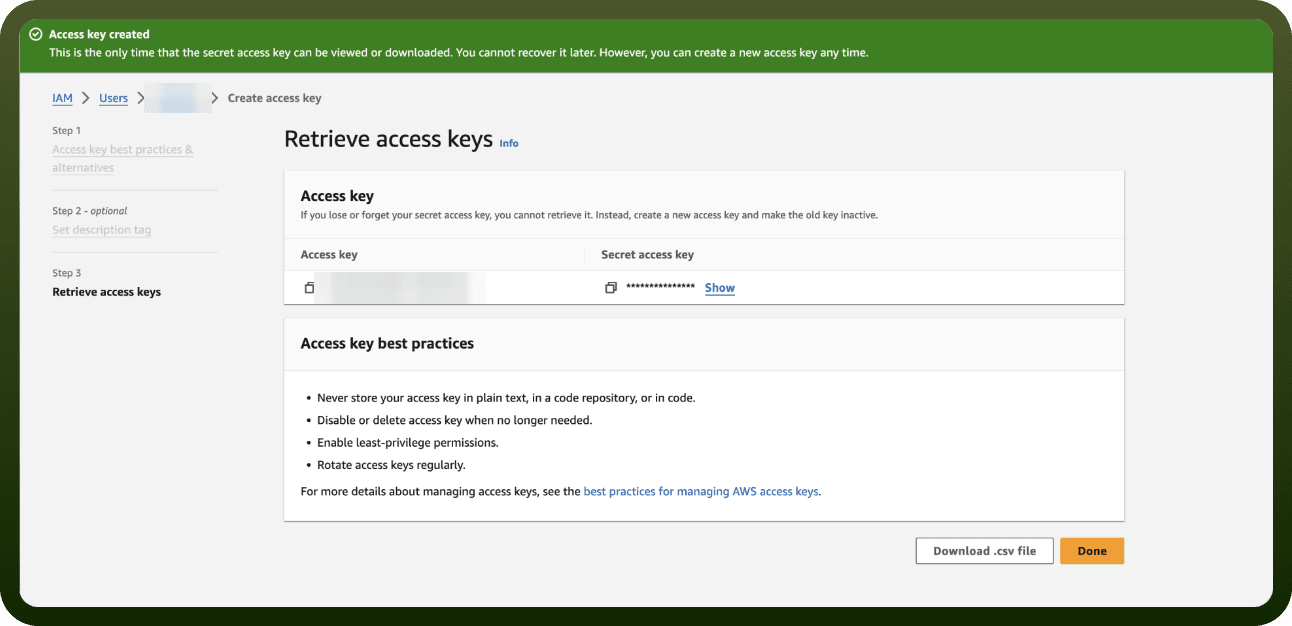
Copy the access key ID and secret access key into the connection form. Store them securely; anyone with them can access your AWS account.
The screenshot below shows the Retrieve access keys page that appears after you create an access key:
Actions
Action Name | Description |
|---|---|
Delete lexicon | Deletes the specified pronunciation lexicon stored in an AWS Region from Amazon Polly. |
Describe voices | Returns the list of voices that are available for speech synthesis in Amazon Polly. |
Get lexicon | Returns the content of the specified pronunciation lexicon stored in an AWS Region. |
Get speech synthesis task | Retrieves a specific SpeechSynthesisTask object based on its TaskId in Amazon Polly. |
List lexicons | Returns a list of pronunciation lexicons stored in an AWS Region. |
List speech synthesis tasks | Returns a list of SpeechSynthesisTask objects ordered by their creation date in Amazon Polly. |
Put lexicon | Stores a pronunciation lexicon in an AWS Region. |
Start speech synthesis task | Creates an asynchronous speech synthesis task and stores the output in an S3 bucket. |