


Use the Mailgun connector to manage Mailgun domains, routes, mailing lists and users.
Integrating your application with Mailgun lets you use these operations in an automation. It exposes 10 actions, listed below. Add the connector from the Connections area, authenticate, then select its operations in the automation builder. Capabilities: actions.
Authentication
Before you begin, make sure you have the following information:
Connection Name: Choose a meaningful name for your connection. This name helps you identify the connection within your application or integration settings.
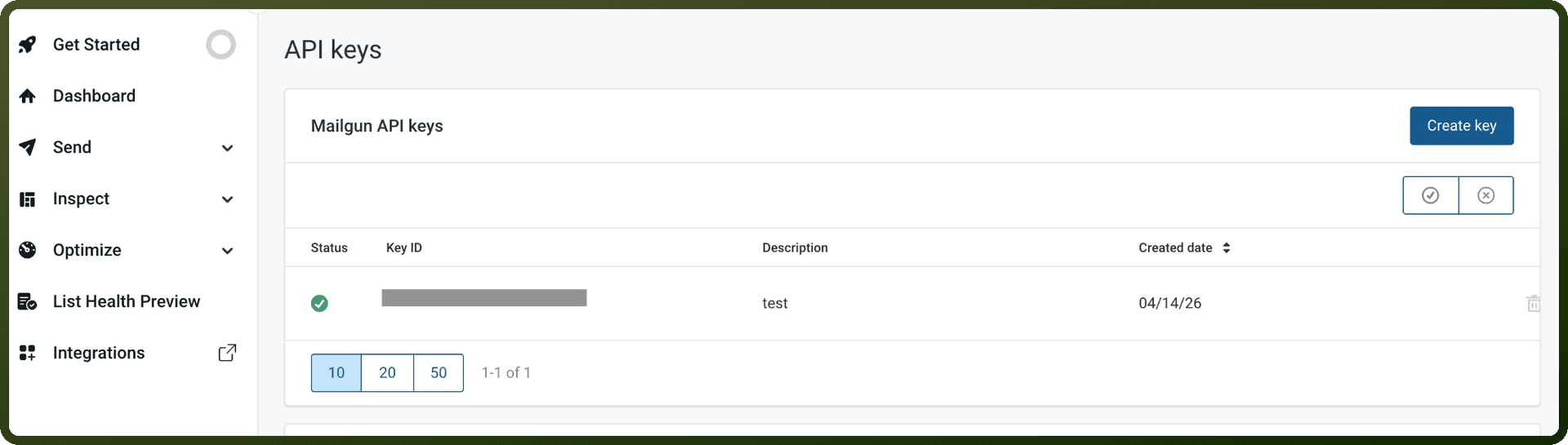
Private API key: The Private API key from your Mailgun account. Domain Sending Keys won't work with these actions.
Obtaining Your API Key
Log in to your Mailgun account and open the Mailgun Dashboard.
Click Account Settings.
Select API Keys from the menu.
Click the eye icon next to Private API Key to reveal your primary account API key.
Copy the key and paste it into the Private API key field in your connection configuration.
Which key to use
Use your Private API key. Domain Sending Keys only allow sending messages, so they won't work with this connector's actions.
Actions
Action Name | Description |
|---|---|
Create mailing list | Creates a mailing list in Mailgun |
Create mailing list member | Adds a member to a mailing list in Mailgun |
Get domain details | Gets domain details by name in Mailgun |
Get domains | Lists domains with optional filters in Mailgun |
Get mailing list members | Lists members of a mailing list in Mailgun |
Get mailing lists | Lists mailing lists on the account in Mailgun |
Get route | Gets a route by ID in Mailgun |
Get routes | Lists all routes on the account in Mailgun |
Get user details | Gets a user's details by ID in Mailgun |
Get users | Lists users on the account in Mailgun |
About the API
Mailgun offers comprehensive email infrastructure services:
Message sending and core email delivery
Domain management, keys, tracking, and DKIM security
Webhooks for account and domain-level event notifications
Reporting (metrics, logs, bounce classification, tags, events, statistics)
Suppressions management (unsubscribes, complaints, bounces, allowlists)
Email reception with routes and forwards
Account and domain-level email templates
IP management with pools, warmup programs, and allowlisting
Multi-tenant account management via subaccounts
Official documentation
https://documentation.mailgun.com/docs/mailgun/api-reference/mg-auth