


DocuSign is a leading eSignature platform that enables users to sign, send, and manage documents digitally. It offers secure, legally binding signatures and seamless workflows to streamline agreements.
Integrating your application with DocuSign streamlines document management, facilitating secure and efficient e-signature workflows.
Authentication
Before you begin, make sure you have the following information:
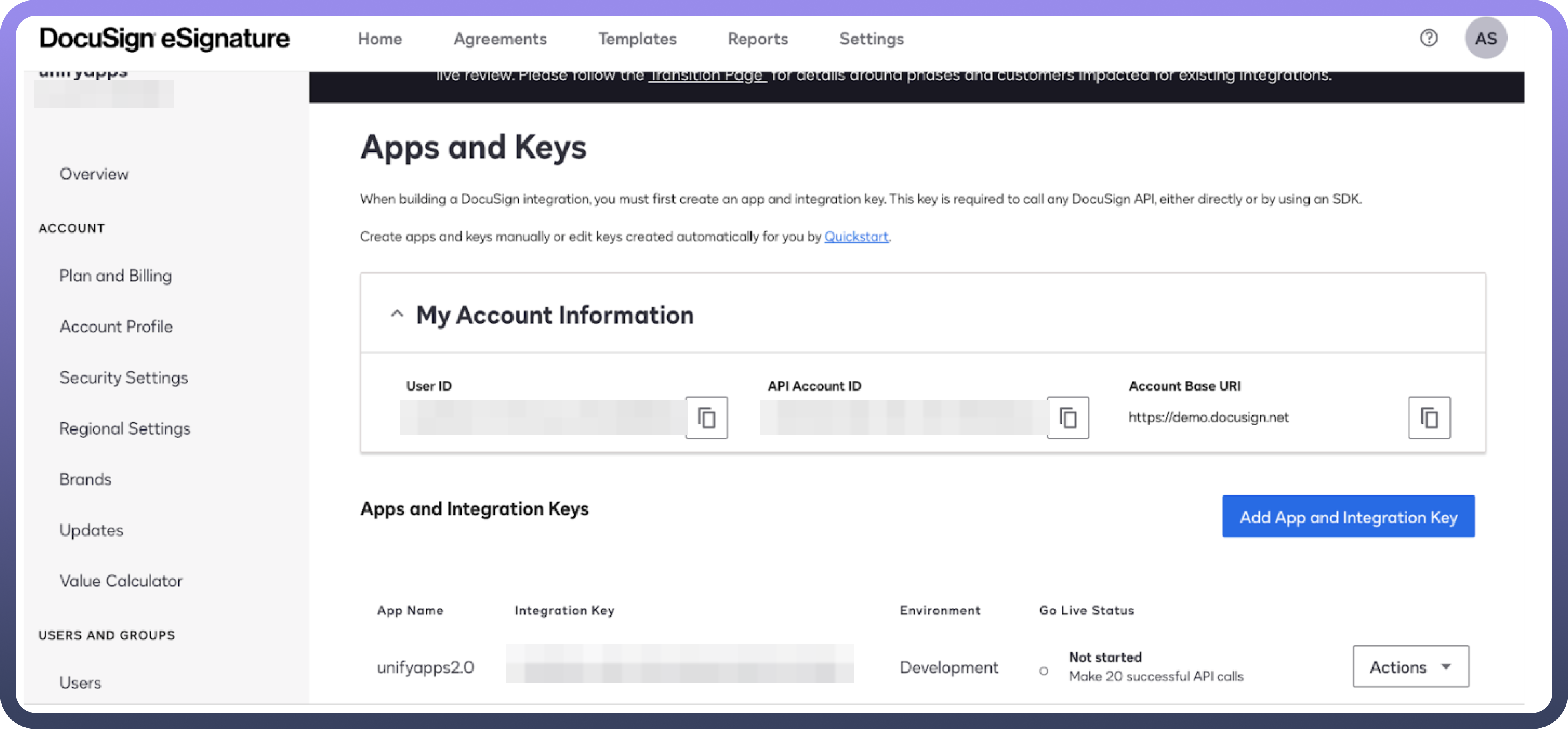
Connection Name: Select a descriptive name for your connection, like "MyAppDocusignIntegration". This helps in easily identifying the connection within your application or integration settings.Authentication Type: DocuSign supports OAuth (default), JWT Token and OAuth with Client Credentials.Account type: Required. Select sandbox for a DocuSign developer account or production for a live account.DomainandAccount ID: Your account base URI (for example, https://demo.docusign.net) and your account ID, both shown in the Apps and Keys page.
JWT Token
In the left navigation menu, click on “
Apps and Keys” under the Integration section.In the apps and Key section, click on “
Add App and Integration Key”.In the Service integration section, click on “
Generate RSA” to generate the Private keySelect the HTTP methods you want to use in your app.
After creating the app,
Integration IDis mapped to the app that has been created.Account IDwill be available at the top left corner of the page.In the Apps and Key section you'll be able to find the
User IDandDomain(i.e Account Base URL)
In the connection form, enter the Integration Key, User ID and the RSA private key you generated.
OAuth with Client Credentials
In Apps and Keys, open your app. Its Integration Key is your Client ID.
Add a secret key and copy it. This is your Client secret.
In UnifyApps, copy the Callback URL shown in the connection form and add it as a redirect URI of the app.
Enter the Client ID and Client secret in the connection form, choose the Scopes, and authorize the connection.
OAuth
Select OAuth, choose the Scopes, then sign in to DocuSign and authorize UnifyApps when prompted.
Actions
Actions | Description |
|---|---|
| Creates a recipient view for signing in DocuSign |
| Creates/Sends a document in DocuSign |
| Downloads a document from DocuSign |
| Get envelope in DocuSign |
| Get folder in DocuSign |
| Retrieve user information using oauth in DocuSign |
| Lists all the documents in an envelope in DocuSign |
| Lists folders in DocuSign |
| List recipients of an envelope in DocuSign |
| Resends an envelope in DocuSign |
| Search envelopes in DocuSign |
| Sends a document using a template in DocuSign |
Triggers
| Triggers | Description |
New click event | Triggers when a new click event occurs in DocuSign |
New document event | Triggers when a new document event occurs in DocuSign |
New document received | Triggers when a new document is received in DocuSign |
New recipient event | Triggers when a new recipient event occurs in DocuSign |
New template event | Triggers when a new template event occurs in DocuSign |