


Use the Arize connector to monitor and evaluate machine learning models.
Integrating your application with Arize lets you use these operations in an automation. It exposes 1 action, listed below. Add the connector from the Connections area, authenticate, then select its operations in the automation builder. Capabilities: actions.
Authentication
Before you begin, make sure you have the following information:
Connection Name: Choose a meaningful name for your connection. This name helps you identify the connection within your application or integration settings.
Authentication Type: Arize uses token authentication. The connection asks for two values: Space ID and API key.
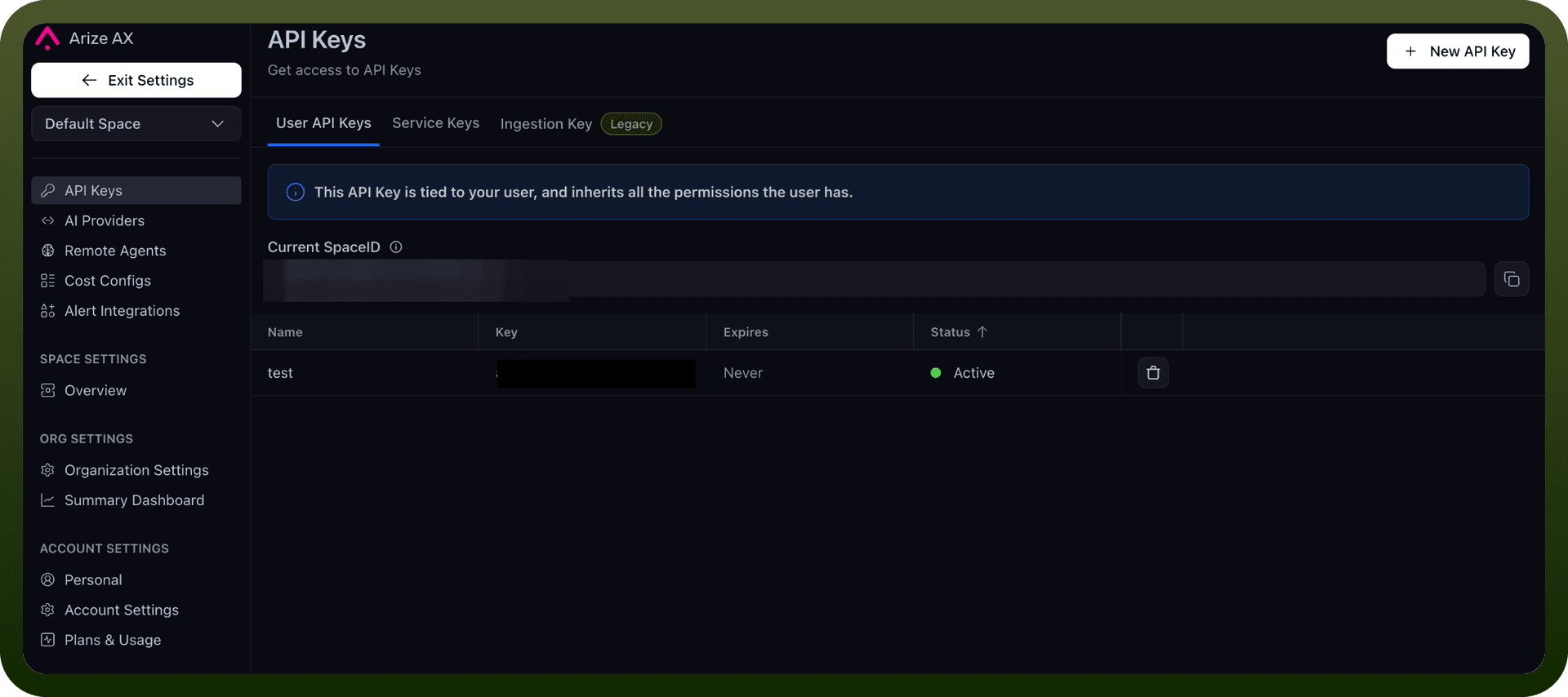
Get your Space ID and API key
Log in to Arize and go to Settings > API Keys.
Copy the Current Space ID.
Create a User API key and copy it.
In UnifyApps, paste the values into the Space ID and API key fields of the Arize connection.
Actions
Action Name | Description |
|---|---|
Send traces to Arize | Sends traces to Arize |